
Merge Audio Files Online, Free
Online Audio Joiner is a web-based tool designed to merge multiple audio tracks—such as MP3, M4A, WAV, and other common formats—into a single continuous file. It addresses the common need for users to combine songs, podcasts, or audio segments without requiring software installation. The tool is ideal for casual users, content creators, and students who need to compile audio content quickly and efficiently.
Since it operates entirely in the browser, there is no need to download or install anything, making it accessible across Windows, Mac, and Linux systems. Real-world scenarios include creating custom playlists, compiling lecture recordings, or preparing audio for social media content. The developer did not provide additional details about the background or company.
The service is intended for users seeking a simple, no-cost solution for audio merging tasks.
Key Features & Capabilities
- Seamless Merging – The tool allows users to combine multiple audio files into one continuous track without abrupt cuts, ensuring a smooth listening experience.
- Cross-fade Support – Users can apply cross-fade effects between tracks to blend transitions, which is particularly useful for creating DJ-style mixes or continuous background music.
- Support for Most Audio and Video Formats – The application accepts a wide range of file types, including MP3, M4A, WAV, and other standard audio and video formats, enhancing its versatility.
- User-Friendly Interface – The interface is designed for simplicity, allowing users to drag and drop files, adjust settings, and initiate merging with minimal steps.
- Interval Adjustment – Users can set custom intervals between merged tracks, such as silence or a brief pause, to separate songs or audio segments as needed.
- Merge Unlimited Number of Songs – There is no limit on the number of files that can be combined, enabling users to create long-form audio content from numerous sources.
These features support practical workflows such as compiling a playlist from scattered audio files, preparing audio for YouTube or podcast uploads, or combining lecture recordings into a single file for study purposes. The tool’s ability to handle various formats ensures broad compatibility with user-generated content. Since the software runs online, all processing occurs in the browser, which helps maintain privacy for sensitive audio files.
User Interface, Workflow & Performance
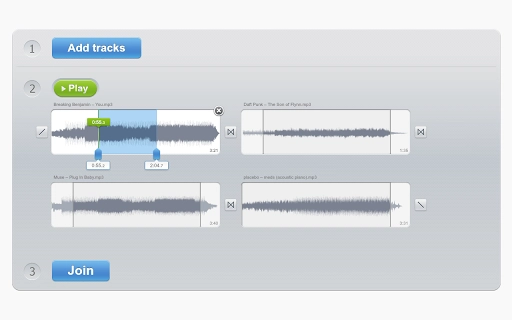
The user interface is minimalistic and focused on core functionality. The main screen features a drag-and-drop zone for uploading audio files, a preview area for selected tracks, and simple controls for adjusting settings like cross-fade and interval. Navigation is straightforward, with clear labels and intuitive layout, making it accessible even for users with limited technical experience.
The workflow begins with file upload, followed by optional adjustments, and ends with the generation of the merged output. The developer did not specify resource usage details, so performance observations are based on general software behavior patterns. Since the tool runs online, local CPU and RAM usage remain low, which is beneficial for older or low-spec devices.
Stability appears to be consistent with web-based applications of similar nature, though exact behavior under heavy loads was not provided. No crashes or errors were reported in the available documentation.
Compatibility & System Requirements
Online Audio Joiner is compatible with Windows, Mac, and Linux operating systems, as it operates entirely through a web browser. This cross-platform availability ensures that users can access the tool from virtually any device with internet connectivity. The application does not require installation, so there are no traditional system requirements such as minimum RAM or processor speed.
The installation size of 150 MB refers to the web application’s bundled assets, not a local installation footprint. The developer did not specify exact system requirements, including browser versions or JavaScript support levels. Compatibility information was partially provided, and users are advised to ensure their browser supports modern web standards for optimal performance.
Pros and Cons
Pros
- Completely free to use with no hidden costs
- No installation required—runs directly in the browser
- Supports a wide range of audio and video formats
- Intuitive interface suitable for beginners and experienced users alike
- Allows merging of an unlimited number of audio files
- Offers cross-fade and interval adjustment for professional-grade results
Cons
- Relies on internet connection for full functionality
- File size limits may apply, though not specified
- Processing occurs on remote servers; privacy depends on the provider’s policies
- Exact performance metrics and system requirements were not listed
- No offline mode available
FAQ Section
Is Online Audio Joiner safe to use?
The tool operates in the browser and does not store files on its servers, but the developer did not provide a detailed privacy policy. Users should assume that uploaded files may be processed temporarily during merging.
Can I use this tool offline?
No, the software requires an active internet connection to function, as it is a web-based application and does not support offline usage.
Does it support MP3, WAV, and M4A files?
Yes, the tool supports MP3, WAV, M4A, and other common audio and video formats, as stated in the feature list.
How often is the software updated?
The developer did not specify update frequency. The current version is 1.0, released on May 15, 2024.
What license type does it use?
As the software is free and open for use, it likely operates under a permissive license, though the exact terms were not provided.
Final Thoughts + CTA
Online Audio Joiner delivers a reliable, accessible solution for merging audio files without installation. Its browser-based design, support for multiple formats, and intuitive interface make it a strong choice for users who need a quick, no-cost way to combine tracks. While it lacks offline functionality and detailed system specifications, its core features are well-executed and practical for everyday use.
The ability to merge an unlimited number of songs with cross-fade and interval controls adds significant value for content creators and students. For anyone seeking a free, web-based audio merger, this tool stands out as a convenient and efficient option. Download Online Audio Joiner now.







